Calculations
The Calculations feature (Admin > Metamodel > Calculations tab) lets you define formulas that automatically compute field values when cards are saved. This is powerful for deriving metrics, scores, and aggregations from your architecture data.
How It Works
- An admin defines a formula targeting a specific card type and field
- When any card of that type is created or updated, the formula runs automatically
- The result is written to the target field
- The target field is marked as read-only on the card detail page (users see a "calculated" badge)
Creating a Calculation
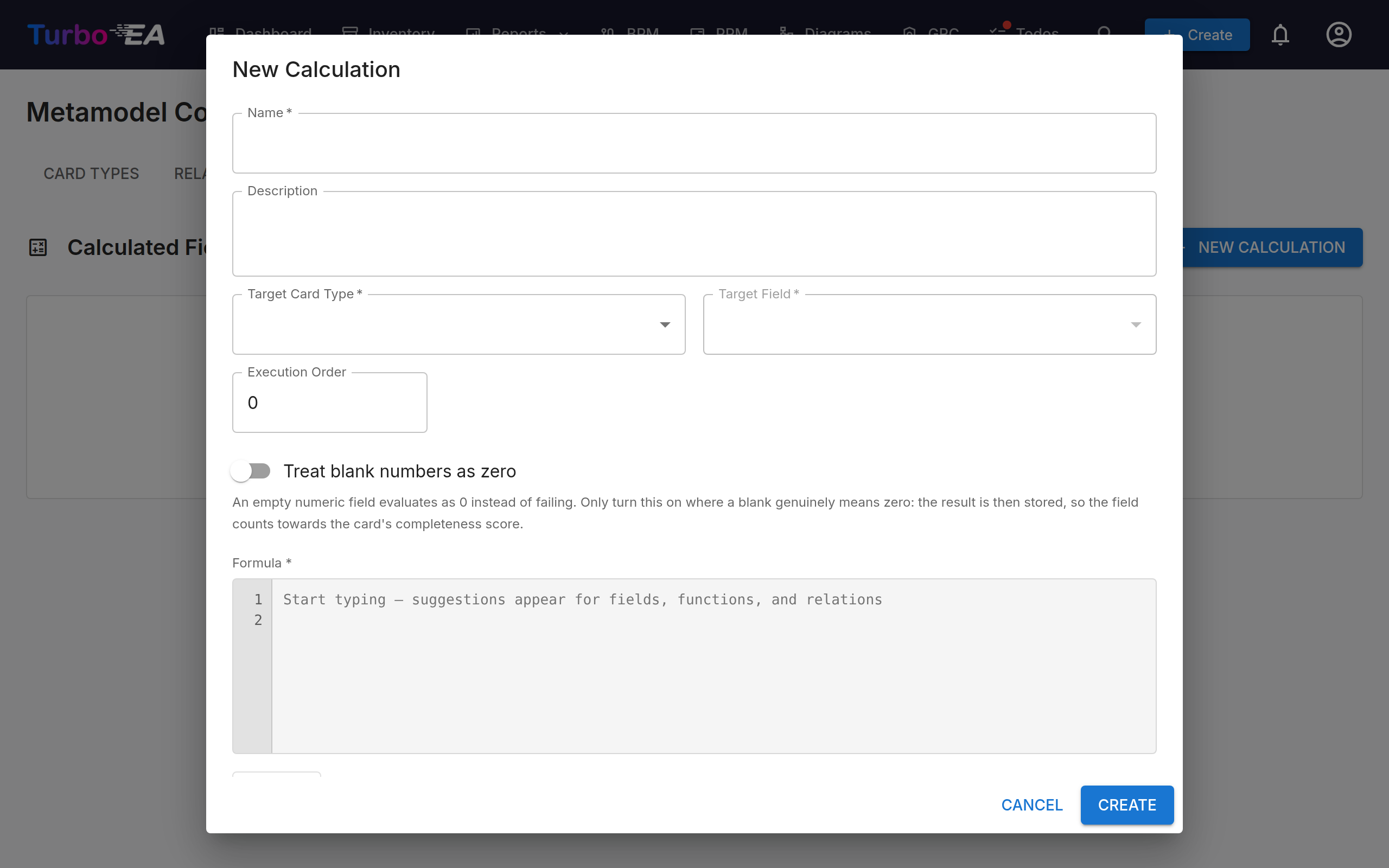
Click + New Calculation and configure:
| Field | Description |
|---|---|
| Name | Descriptive name for the calculation |
| Target Type | The card type this calculation applies to |
| Target Field | The field where the result is stored |
| Formula | The expression to evaluate (see syntax below) |
| Execution Order | Order of execution when multiple calculations exist for the same type (lower runs first) |
| Active | Enable or disable the calculation |
Formula Syntax
Formulas use a safe, sandboxed expression language. You can reference the current card's fields, related and child cards, the parent card, and lifecycle dates.
Use the field key, not the field label
Fields are referenced by their key, which is usually camelCase (costTotalAnnual),
not by the label shown on the card (Total Annual Cost). A name that does not exist
resolves to None, and arithmetic on None fails with a generic Evaluation error.
You can look the key up in Admin > Metamodel > (card type) by opening the field
and reading its Key. Easier: in the formula editor, the chips underneath the formula
box list data.<key> for every field of the selected type, and typing data. opens
autocomplete.
Context Variables
| Variable | Description | Example |
|---|---|---|
data.<fieldKey> |
Any custom field of the current card, by key | data.costTotalAnnual |
data.name, data.description, data.status, data.subtype, data.approval_status, data.reference |
Built-in card properties | data.subtype |
data.lifecycle.<phase> |
Lifecycle dates, where phase is one of plan, phaseIn, active, phaseOut, endOfLife |
data.lifecycle.endOfLife |
relations.<relationTypeKey> |
Array of cards linked by that relation type, in either direction | relations.relAppToITC |
relation_count.<relationTypeKey> |
Number of cards linked by that relation type | relation_count.relAppToITC |
children |
Array of direct child cards (hierarchical types) | SUM(PLUCK(children, "attributes.costTotalAnnual")) |
children_count |
Number of direct children | children_count |
parent |
The parent card (object with id, name, type, subtype, attributes), or None for a root card |
IF(parent, parent.attributes.businessCriticality, data.businessCriticality) |
hierarchy_level |
Depth of the current card in its parent-child hierarchy (1 = root, not capped). 1 for non-hierarchical card types |
hierarchy_level * 10 |
The relation type key is the key from Admin > Metamodel > Relations, for example
relAppToITC or relInitiativeToApp. Direction does not matter: a card finds a relation
type under the same key whether it sits at the source or the target end of it. Archived
cards are excluded from relations, relation_count and children.
Reading Fields off a Related Card
Each entry in relations.<relationTypeKey> and in children is a wrapper object, not the
related card's fields directly:
{
  "id": "8f1c…",
  "name": "NexaCore ERP",
  "type": "Application",
  "attributes":     { "costTotalAnnual": 45000, "businessCriticality": "missionCritical" },
  "rel_attributes": { "costTotalAnnual": 12000 }
}
attributesholds the related card's own field values.rel_attributesholds values stored on the link itself, if the relation type defines an attributes schema. For example,relAppToITCcarries its owncostTotalAnnual, so you can record what one application spends on one IT component.
This matters for PLUCK and FILTER, which take a key path and therefore need the
attributes. prefix to reach a field:
# Sum the annual cost of the IT Components this application uses
SUM(PLUCK(relations.relAppToITC, "attributes.costTotalAnnual"))

# Sum the cost recorded on each application-to-component link instead
SUM(PLUCK(relations.relAppToITC, "rel_attributes.costTotalAnnual"))
Plucking a bare key such as "costTotalAnnual" looks for it on the wrapper object, finds
nothing, and returns a list of None, which SUM reports as 0. A relation formula that
stubbornly returns 0 is almost always a missing attributes. prefix.
Handling Empty Values
A field with no value resolves to None, and None in an arithmetic expression raises an
error. Wrap every field that may be blank in COALESCE:
COALESCE(data.licenseCost, 0) + COALESCE(data.supportCost, 0) + COALESCE(data.infraCost, 0)
SUM, AVG, MIN and MAX already skip non-numeric entries, so they need no guarding.
Where a blank genuinely means zero across a whole formula, switch on Treat blank numbers as
zero on the calculation instead. Empty fields then evaluate as 0 in arithmetic and in
<, <=, >, >= comparisons, while ==, != and is None keep their normal meaning so
COALESCE and IF(x is None, …) still behave. It is off by default, and worth two thoughts
before turning it on: the result is stored, so a field that used to stay empty now holds a
0 and counts towards the card's completeness score.
PPM Data on Initiative Cards
The ppm root exposes the PPM module's data to formulas: the budget and cost lines, split by
capex and opex and broken down by fiscal year — detail the rolled-up data.costBudget /
data.costActual attributes on the card cannot give you — and the initiative's delivery
figures: its overall completion, its work packages, tasks and risks, and the latest status
report.
| Variable | Description |
|---|---|
ppm.capexBudget, ppm.opexBudget, ppm.totalBudget |
Planned budget, from the PPM budget lines |
ppm.capexPlanned, ppm.opexPlanned, ppm.totalPlanned |
Planned amounts on the PPM cost lines |
ppm.capexActual, ppm.opexActual, ppm.totalActual |
Actuals on the PPM cost lines |
ppm.byYear |
The same nine measures per fiscal year, as a list of {year, capexBudget, …} |
ppm.currentFiscalYear |
The fiscal year today falls in |
ppm.unscheduledPlanned, ppm.unscheduledActual |
Cost lines with no date, which count towards the totals but belong to no year |
ppm.unscheduledCapexActual |
The CapEx actuals of those undated cost lines |
ppm.unscheduledOpexActual |
The OpEx actuals of those undated cost lines |
ppm.completion |
Overall completion in % — the mean of the top-level work packages, exactly the number the initiative's Overview tab shows |
ppm.wbsCount, ppm.milestoneCount |
Number of work packages and of milestones |
ppm.taskCount, ppm.tasksTodo, ppm.tasksInProgress, ppm.tasksDone, ppm.tasksBlocked |
Task counts, in total and by status |
ppm.tasksOverdue |
Tasks past their due date that are not done |
ppm.riskCount, ppm.risksOpen, ppm.riskScoreMax |
PPM risks: all, still open, and the highest risk score |
ppm.reportCount, ppm.reportDate |
How many status reports exist, and the date of the latest one (None until there is one) |
ppm.scheduleHealth, ppm.costHealth, ppm.scopeHealth |
The latest status report's health flags: onTrack, atRisk or offTrack (None until there is one) |
byYear is a list rather than a year-keyed object so the ordinary FILTER and PLUCK
functions work on it:
# Total capex budget across all years
ppm.capexBudget

# Just this fiscal year's capex budget
SUM(PLUCK(FILTER(ppm.byYear, "year", ppm.currentFiscalYear), "capexBudget"))

# Capex budget of every Initiative linked to this card
SUM(PLUCK(relations.relInitiativeToApp, "ppm.capexBudget"))

# Overall progress, and a delivery flag from the latest status report
ppm.completion
IF(ppm.tasksOverdue > 0, "At risk", COALESCE(ppm.scheduleHealth, "No report"))
A few rules worth knowing:
- Fiscal years are named after the calendar year they end in. With the Fiscal Year Start set to October, 15 Oct 2025 falls in FY2026 and 30 Sep 2025 in FY2025. With the default January start a fiscal year is simply the calendar year.
- Budget lines and cost lines get their year from different places. A budget line carries the fiscal year you typed into it; a cost line's year is derived from its date. If your organisation labels budget lines by the year the period starts, the two will disagree.
total*is the sum of every line, notcapex + opex. A line whose category is neither (from an import, say) still counts towards the total.- A card that is not an Initiative reads every
ppmmeasure as0with an emptybyYear, so a formula on the wrong card type returns zero rather than failing. The latest-report fields readNonerather than0— "no report yet" and "on track" are different facts — so guard them withCOALESCE.
Editing a PPM budget or cost line, a work package, a task, a risk or a status report re-runs the initiative's calculations, so anything derived from this data updates straight away and the change appears on the card's History tab. Cards that read another card's PPM data through a relation are not refreshed — see When Calculations Run.
Show initiative progress on a card or a portal
An initiative's progress lives on its Overview tab; cards and published portals only ever show attributes. To put the same number on the card and in a web portal:
- In Admin → Metamodel, add a field of type Percentage to the Initiative type — say
progress, labelled Progress. It renders as a progress bar. - In Admin → Calculations, add a calculation on Initiative with the formula
ppm.completion, target that field, and activate it. - In the portal's properties, tick the field for the card list and the detail view.
From then on marking a task done, editing a work package's completion, or deleting one moves the bar wherever the card is shown.
Rolling PPM figures up the Initiative hierarchy
The PPM portfolio board shows a parent without budget or cost lines of its own the total of the initiatives beneath it, but that figure lives on the board only. To show on a program — in the Inventory, reports and portals — the budget of everything beneath it, use one calculation that reads its children's result:
- In Admin → Metamodel, add a field of type Cost to the Initiative type — say
rolledUpBudget, labelled Rolled-up budget. - In Admin → Calculations, add a calculation on Initiative with the formula
ppm.totalBudget + SUM(PLUCK(children, "attributes.rolledUpBudget")), target that field, and activate it. - Run it once from the list to fill in the initiatives that already exist.
The same formula serves every level: a project adds its own budget to nothing, a program adds
its own to its projects' totals, and so on upwards. Because each level reads what its children
hold, the order matters, and Turbo EA takes care of it: a manual run processes the hierarchy
deepest first, and a change to a budget line, cost line, work package, task, risk or status
report re-runs the initiative's ancestors, nearest parent first. Swap ppm.totalBudget for
ppm.totalActual, ppm.capexBudget or any other ppm measure to roll up another figure — one
field per figure.
Built-in Functions
| Function | Description | Example |
|---|---|---|
IF(condition, true_val, false_val) |
Conditional logic. Only the taken branch is evaluated | IF(data.businessCriticality == "missionCritical", 100, 25) |
SUM(array) |
Sum of numeric values | SUM(PLUCK(relations.relAppToITC, "attributes.costTotalAnnual")) |
AVG(array) |
Average of numeric values | AVG(PLUCK(children, "attributes.numberOfUsers")) |
MIN(array) |
Minimum value | MIN(PLUCK(relations.relAppToITC, "attributes.costTotalAnnual")) |
MAX(array) |
Maximum value | MAX(PLUCK(relations.relAppToITC, "attributes.costTotalAnnual")) |
COUNT(array) |
Number of items | COUNT(relations.relAppToInterface) |
ROUND(value, decimals) |
Round a number | ROUND(data.costTotalAnnual / 12, 2) |
ABS(value) |
Absolute value | ABS(data.budgetVariance) |
LN(value) |
Natural logarithm. Returns None for zero, negative and non-numeric input |
LN(data.numberOfUsers) |
COALESCE(a, b, ...) |
First non-null value | COALESCE(data.customScore, 0) |
LOWER(text) |
Lowercase text | LOWER(data.productName) |
UPPER(text) |
Uppercase text | UPPER(data.subtype) |
CONCAT(a, b, ...) |
Join strings | CONCAT(data.name, " (", data.subtype, ")") |
CONTAINS(text, search) |
Check if text contains substring | CONTAINS(data.description, "legacy") |
PLUCK(array, key) |
Extract a key path from each item | PLUCK(relations.relAppToITC, "attributes.costTotalAnnual") |
FILTER(array, key, value) |
Keep items whose key path equals a value | FILTER(relations.relOrgToApp, "attributes.hostingType", "onPremise") |
MAP_SCORE(value, mapping) |
Map categorical values to scores | MAP_SCORE(data.businessCriticality, {"missionCritical": 3, "businessCritical": 2}) |
The safe Python builtins len, str, int, float, bool, abs, round, min, max
and sum are available too, as are the usual operators and comparisons.
Example Formulas
Sum of several cost fields on the same card:
COALESCE(data.licenseCost, 0) + COALESCE(data.supportCost, 0) + COALESCE(data.infraCost, 0)
Total annual cost of the IT Components an application uses:
SUM(PLUCK(relations.relAppToITC, "attributes.costTotalAnnual"))
Risk score based on criticality:
IF(data.businessCriticality == "missionCritical", 100, IF(data.businessCriticality == "businessCritical", 75, 25))
Count of related interfaces:
relation_count.relAppToInterface
Count of on-premise applications in an organization:
COUNT(FILTER(relations.relOrgToApp, "attributes.hostingType", "onPremise"))
Roll a cost up from child cards:
SUM(PLUCK(children, "attributes.costTotalAnnual"))
TIME Model placement (Tolerate / Invest / Migrate / Eliminate), the same example you'll see in the Formula Reference panel inside Admin → Metamodel → Calculations when creating a new calculation. Target type = Application, target field = timeModel. Assumes you have added two single_select fields named businessFit and technicalFit with options excellent, adequate, insufficient, unreasonable:
# ── TIME Model (Tolerate / Invest / Migrate / Eliminate) ──
# Assumes single_select fields: businessFit and technicalFit
# with options: excellent, adequate, insufficient, unreasonable.
#
# Scoring: Map each dimension to 1-4 numeric scale.
# Business Fit  = Y-axis (how well does it serve the business?)
# Technical Fit = X-axis (how healthy is the technology?)
#
# Quadrant logic (threshold at score 2.5):
#   Invest    = high business + high technical
#   Migrate   = high business + low technical
#   Tolerate  = low business  + high technical
#   Eliminate = low business  + low technical
#
bf = MAP_SCORE(data.businessFit, {"excellent": 4, "adequate": 3, "insufficient": 2, "unreasonable": 1})
tf = MAP_SCORE(data.technicalFit, {"excellent": 4, "adequate": 3, "insufficient": 2, "unreasonable": 1})
IF(bf is None or tf is None, None, IF(bf >= 2.5, IF(tf >= 2.5, "invest", "migrate"), IF(tf >= 2.5, "tolerate", "eliminate")))
As the example shows, a formula can span several lines. A line of the form name = expression
stores an intermediate value that later lines can reuse, and the value of the last line is
what gets written to the target field.
This is also the worked example referenced by the EA Beginner's Guide.
Comments are supported using #:
# Calculate weighted risk score
IF(data.businessCriticality == "missionCritical", data.riskScore * 2, data.riskScore)
Validating and Testing
The formula editor offers two different checks, and they behave differently:
- Validate runs the formula against a synthetic card. Every numeric field is seeded with
a dummy value of
1, and the card has no relations, no children and no parent data of its own. It confirms that the syntax parses and that the names you used exist, but a formula that aggregates overrelationsorchildrenwill always preview as0or empty here. That is expected and not a sign of a broken formula. - Test, available on a saved calculation, runs against a real card that you pick. This is the one to use for anything involving relations, children or the parent. Nothing is written to the card, the result is only shown to you.
Two more checks run without you asking:
- A field key that does not exist is refused when you save. The error names the key and
suggests the nearest real one, so
data.LicenseCostis caught before it reaches a card rather than failing on every one of them. Only the formula and target type are checked, and only when you change them, so an older calculation can still be renamed or reordered. - A
PLUCKorFILTERkey that cannot match produces a warning. Reading a related card's field without theattributes.prefix raises no error at all — it quietly returns0forever — so a warning is the only way to find out. Warnings never block saving; they appear under the formula and as a chip in the calculations list.
Reading the Results of a Manual Run
Running a calculation from the list evaluates it for every card of the target type and reports what happened, not just how many cards it touched. View details on the result banner opens the breakdown:
- One block per calculation, with the number of cards that computed cleanly and the number that failed. Every active calculation on the type runs together, so this is what tells you which one is at fault.
- One row per distinct error, with the number of cards it was raised on. A formula that is wrong is wrong the same way everywhere, so twenty-one failures are usually one fix, not twenty-one.
- The cards themselves, listed under each error and linked, so you can open one and look at the data that broke it. At most ten are listed per error; when more were hit, the rest are shown as a count.
Copy report puts the whole breakdown on the clipboard as plain text.
The status chip in the calculations list reflects the same run: red when any card failed, green only when every one of them computed.
When Calculations Run
Calculations for a card are re-evaluated when:
- the card is created or saved;
- a relation touching the card is created, updated or deleted (both ends of the relation are recomputed);
- the card is re-parented, which recomputes its whole subtree;
-
you run the calculation manually from the list, which evaluates it for every card of the target type and saves the results.
-
a PPM budget line, cost line, work package, task, risk or status report on the card changes, for an Initiative.
- the change above happens on an Initiative lower in the hierarchy: every Initiative above it is re-run as well, nearest parent first, so a roll-up follows the change.
A manual run evaluates the cards of a hierarchical type deepest first, children before their parent, so a formula that reads its children's calculated values settles in one run.
They are not re-evaluated when a different card that this formula reads from is edited.
If you change a cost on an IT Component, an application that aggregates it will not move
until that application is saved, a relation on it changes, or you run the calculation for
the type. The same applies to a card reading a related Initiative's ppm data. For
aggregates over data other people maintain, run the calculation periodically or after a bulk
import.
Note
The same applies to parent-derived and hierarchy_level-derived values: they refresh
on re-parenting and on a manual run, not on every edit of the parent card. Always guard
a parent reference with IF(parent, …) so root cards, where parent is None, do
not error.
Execution Order
When multiple calculations target the same card type, they run in the order specified by their execution order value. This is important when one calculation depends on the result of another: set the dependency to run first (lower number).
Turbo EA rejects a set of calculations that would form a cycle, for example a field A computed from field B while B is computed from A.