Risk Register¶
The Risk Register captures architecture risks through their full lifecycle — from identification to mitigation, residual assessment, monitoring and closure (or formal acceptance). It lives as the Risk tab of the GRC module at /grc?tab=risk.
The register grid can be grouped: the Group by button in the table toolbar groups risks under collapsible headers by status, category, initial or residual level, or owner, with a "Not set" bucket first — handy for walking a review meeting through the register one bucket at a time. Scroll into a long bucket and its header stays pinned below the column headers, so you never lose track of which one you are in.
TOGAF alignment¶
The register implements the Architecture Risk Management process from TOGAF ADM Phase G — Implementation Governance (TOGAF 10 §27):
| TOGAF step | What you capture |
|---|---|
| Risk classification | Category (security, compliance, operational, technology, financial, reputational, strategic) |
| Risk identification | Title, Description, Source (manual or promoted from a TurboLens finding) |
| Initial assessment | Initial probability × Initial impact → Initial level (derived automatically) |
| Mitigation | One or more Mitigation tasks — owned work items, one-shot or recurring (see Mitigation tasks below). The risk also carries an Owner and a Target resolution date. |
| Residual assessment | Residual probability × Residual impact → Residual level (editable once mitigation is planned). Stays a manual assessment — task completion does not auto-adjust it. The detail page surfaces a "X/Y open · Z overdue" task summary alongside the residual block as context for the human judgement (ISO 31000-aligned). |
| Monitoring / acceptance | Status workflow: identified → analysed → mitigation_planned → in_progress → mitigated → monitoring → closed (with an accepted side-branch requiring an explicit rationale) |
Creating a risk¶
Two paths both land in the same Create risk dialog — each variant prefills different fields so you can edit and submit:
- Manual — Risks tab → + New risk. Blank form.
- From a compliance finding — GRC → Compliance → Create risk on a non-compliant finding. Pre-fills category
compliance, probability/impact from regulation severity + status, description from requirement + gap.
Both variants include Owner, Category, and Target resolution date fields so you can assign accountability at creation time — no need to re-open the risk to add them.
Promotion is idempotent — once a finding has been promoted its button flips to Open risk R-000123 and navigates straight to the risk detail page.
Ownership → Todo + notification¶
Assigning an owner to the risk (either at create time or later) automatically:
- Creates a system Todo on the owner's Todos page. The description reads
[Risk R-000123] <title>, the due date mirrors the risk's target resolution date, and the link jumps back to the risk detail. The Todo auto-marks as done when the risk reachesmitigated/monitoring/accepted/closed. - Fires a bell notification (
risk_assigned) — shown in the bell dropdown and the notifications page, with optional email if the user has opted in. Self-assignment also fires the bell, so the trail is consistent across team and personal workflows.
Clearing or reassigning the owner keeps the Todo in sync — the old one is removed / reassigned.
The same plumbing fires independently for each mitigation task on the risk, so a contributor only sees the work they own — see Mitigation tasks below.
Linking risks to cards¶
Risks are many-to-many with Cards. A risk can affect multiple Applications or IT Components, and a Card can have multiple risks linked to it:
- From the risk detail page: Affected cards panel → pick a card and add it. Click an
×to unlink. The picker opens a browsable list straight away (no need to type first), pages in more cards as you scroll, and hides cards that are already linked. - From any Card detail page: new Risks tab lists every risk linked to that card, with a one-click path back to the register.
Linked cards are grouped by card type, ordered alphabetically inside each group, and colour-coded with the card type's own colour, so a risk touching a dozen cards across several types stays readable at a glance. The same ordering and colours apply to the Cards column of the register grid, where each card renders as a chip in its type colour — hover the cell to see the full list under type headings.
Mitigation tasks¶
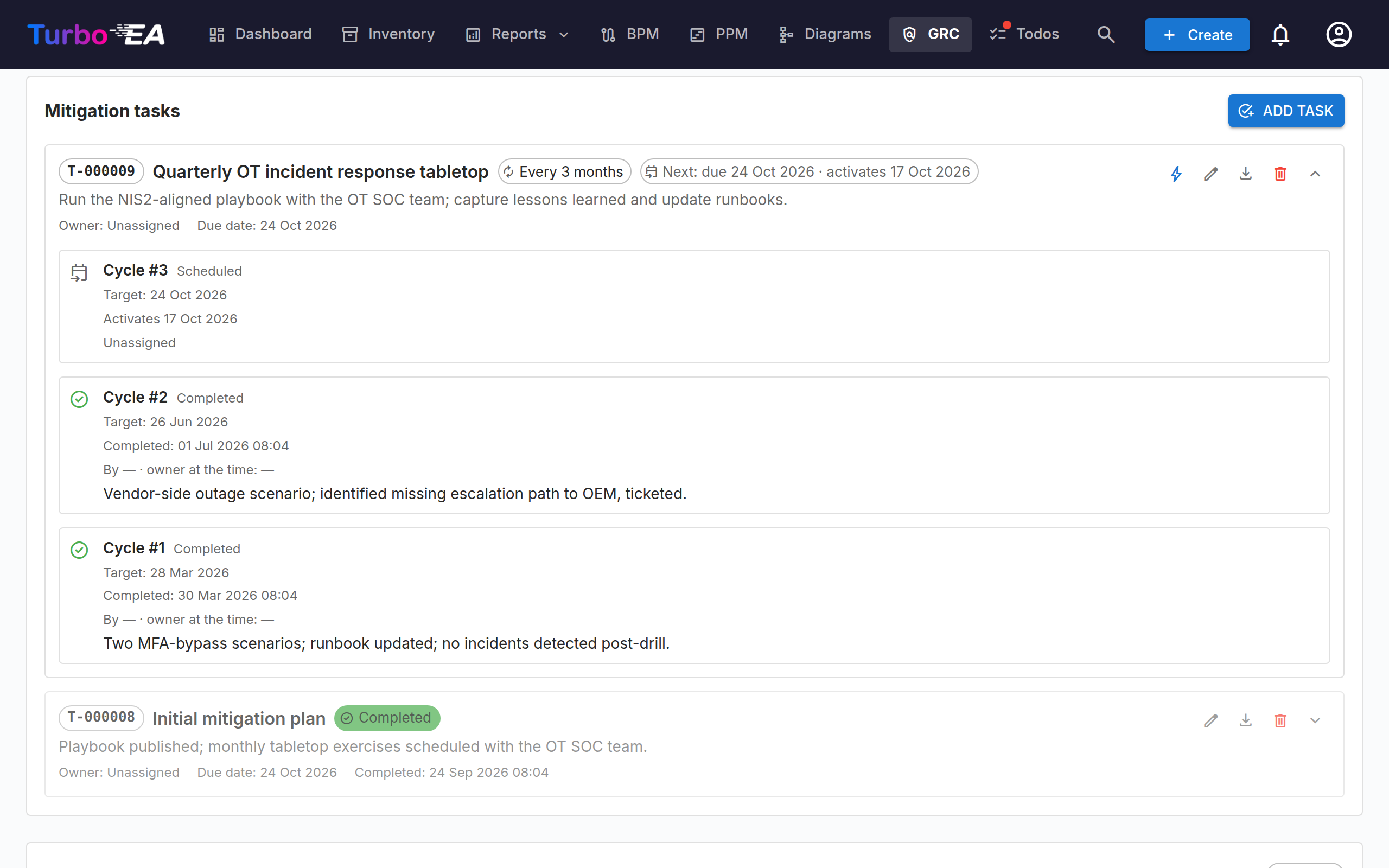
Mitigation is captured as owned work items, not free-text. On the risk detail page the Mitigation tasks panel replaces the old single-field "mitigation plan" — each row is a real task with its own owner, due date, history and (optionally) a recurrence rule.
One-shot vs. recurring¶
A mitigation task is one-shot by default — fitness-for-purpose for "Roll out MFA", "Sign updated SCCs", or any project-shaped piece of work. Toggle Repeats in the task dialog and you get a recurring control review: e.g. "Re-attest cross-border transfer documentation every 12 months", "Run the OT incident response tabletop every 3 months", "Audit Jenkins credentials every week".
Recurring tasks accumulate one cycle (occurrence) per period. The next cycle is created automatically when you close the current one — calendar-correct, so a monthly task due Jan 31 rolls to Feb 28, not March 3.
The lead-time window¶
The whole point of a recurring control review is that the assignee gets reminded just before the due date, not the moment the previous cycle closed. Each recurring task carries a Lead time (days) — how many days before due_date the cycle becomes active and lands on the assignee's /todos list.
Each cycle therefore moves through three visible states:
| Status | What it means | Visible on /todos? |
|---|---|---|
| Scheduled | The next cycle exists for audit ("next review: due 2026-11-15") but is dormant. Today is still outside the lead window. | No |
| Open | The lead window has opened. A system Todo is on the assignee's list with [Risk R-000123] <task title>; a task_assigned notification fires. |
Yes (Open tab) |
| Done / Skipped | The assignee closed the cycle. The Todo flips to done so it stays in the assignee's Done tab as a history record. |
Yes (Done tab) |
The task dialog suggests a sensible lead time per recurrence unit (1 day for daily, 2 for weekly, 7 for monthly, 14 for yearly — capped at half the cycle so the window never overlaps the previous occurrence). The hint auto-updates as you change unit or interval, until you edit the field yourself.
Once a day at 03:00 UTC a background process scans every scheduled cycle and promotes the ones whose lead window has opened. Need to start a review early? Click Activate now (the lightning-bolt icon on the task row) to flip a scheduled cycle to open immediately — same Todo + notification machinery, just without the wait.
Per-cycle audit history¶
Click the expand chevron on a task row to see its full cycle history. Every occurrence stamps:
- The target due date at scheduling time.
- Who was assigned at the moment the cycle opened (
assigned_owner_id), so historical reviews keep their original owner even if you later rotate the role. - For closed cycles: who completed it (
completed_by), the timestamp, the owner-at-completion snapshot (may differ from the assigned owner if you rotated mid-cycle), and any free-text closure notes. - For activated cycles: the activation timestamp (so audit can verify the daily promotion job fired on the right day).
This survives years of owner rotation cleanly — the audit answer to "who signed off on the Jan 2024 review?" is a single row away from the task, not lost to ownership rebalancing.
Permissions & assignees¶
- Add / edit / delete tasks — needs
risks.manage(admin / bpm_admin / member by default). - Complete the open cycle —
risks.manageor the user who is currently assigned to that cycle. So a Viewer assigned to a control review can close their own cycle without escalating. - Skip a cycle / Activate now — always needs
risks.manage. Skipping advances recurrence without claiming the work was done; activation pulls a scheduled cycle forward and is a planning action.
Promoting from a TurboLens compliance finding¶
When you click Create risk on a non-compliant finding (see TurboLens) the new risk also gets a one-shot mitigation task seeded from the finding's remediation text — so the gap analysis turns into actionable, owned work on the spot.
Export¶
The Risk Register's Export button writes a two-sheet .xlsx: sheet 1 is the filtered risk grid, sheet 2 is one row per cycle across every task on every risk in the same filter set, including the lead-time and activation timestamps. Use it for audit packs or for hand-off to stakeholders who don't have a Turbo EA login. Each task row in the detail panel also has its own Export history button for a per-task workbook.
A single risk can also be printed from its detail page: PDF (next to Delete) opens a print-ready dossier — identification, initial and residual assessment, mitigation tasks with their most recent cycles, affected cards, workflow and acceptance rationale — in a new tab, ready for the browser's Save as PDF.
Import¶
The Import button next to Export loads risks in bulk from an .xlsx file. Click Download template to get a starter workbook with the right headers, fill in one risk per row, and upload it. A row whose reference matches an existing risk is skipped (the importer never updates existing risks), so re-importing a previously exported register is idempotent; every other row creates a brand-new risk with a freshly generated R-NNNNNN reference. The preview tells you how many rows will be skipped before you confirm.
Recognised columns: title (required), description, category, initial_probability, initial_impact, residual_probability, residual_impact, status, owner_email, target_resolution_date (YYYY-MM-DD) and cards (semicolon-separated card names). Owners are matched by email and cards by exact name on a best-effort basis — anything that can't be matched is skipped with a non-blocking warning and the risk still imports. Before anything is written you get a preview showing how many rows will be created, which have errors, and any warnings; nothing is persisted until you confirm. Requires the risks.manage permission.
Risk matrix¶
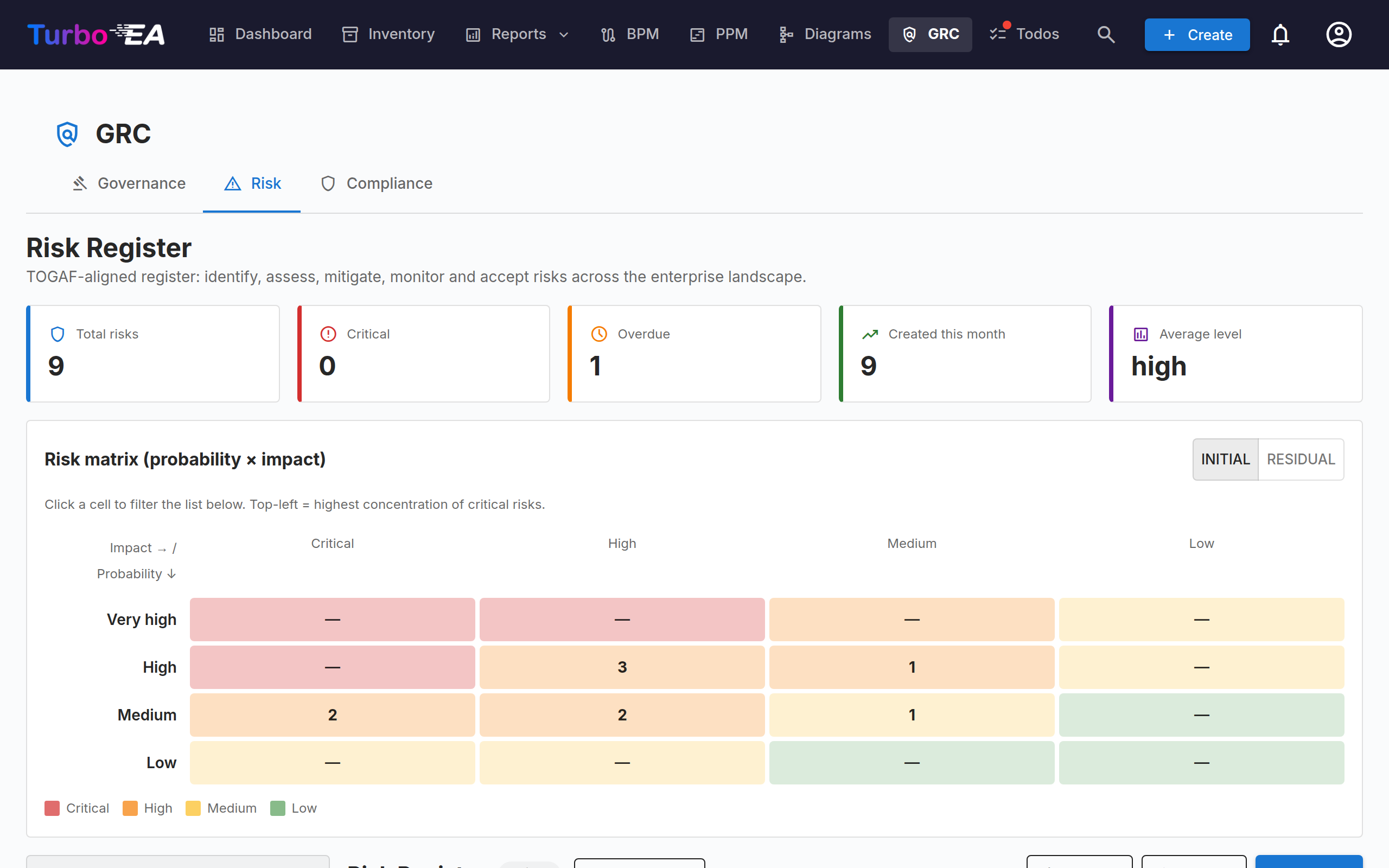
Both the TurboLens Security Overview and the Risk Register page render a 4×4 probability × impact heatmap. Cells are clickable — click one to filter the list below to just that bucket, click again (or the chip's ×) to clear. On the Risk Register you can toggle the matrix between Initial and Residual views so mitigation progress shows up visually.
Register grid¶
The register is an AG Grid that mirrors the Inventory standards: sortable, filterable, resizable columns with per-user persistent preferences (visible columns, sort order, sidebar state). A toolbar + New risk opens the manual create dialog. The toolbar Export button writes a two-sheet .xlsx carrying the filtered risk grid on sheet 1 and one row per mitigation-task cycle on sheet 2 — see Mitigation tasks → Export for the column shape. A Source column shows whether a risk was entered by hand, promoted from a compliance finding or filed by an extension, and it follows the sidebar's Source filter.
Filtering by affected cards¶
The left-hand filter sidebar has an Affected cards section that answers the landscape questions the column filter cannot:
- Cards — pick one or more specific cards to see every risk that affects any of them ("show all risks affecting Applications A, B and C"). The list offers every card linked to at least one risk, searchable by name.
- Card type — tick one or more card types to see every risk touching any card of those types ("show all risks affecting an Application"), without naming individual cards.
Each list matches any of its own selections; the two lists combine with and. Ticking Application and picking the card Payments Gateway therefore returns risks that affect Payments Gateway and touch at least one Application.
Like every other filter in the sidebar, these narrow the whole page at once — the KPI tiles, the 4×4 matrix, the grid, and both sheets of the .xlsx export all follow the active selection.
Risk ↔ Finding propagation¶
If a Risk was promoted from a TurboLens finding, state changes flow both ways:
- The finding carries an Open risk R-000123 back-link from the moment it is promoted (the action is idempotent — clicking it again navigates to the existing risk instead of creating a duplicate).
- When the Risk reaches
mitigated/monitoring/closed/accepted(or is deleted), the back-propagation engine automatically transitions every linked compliance finding to match (mitigated/verified/accepted/in_review). The acceptance rationale you capture on the Risk is mirrored into the finding's review note so the audit trail stays consistent.
This keeps the Risk Register (governance view) and the Compliance grid (operational view) aligned without manual upkeep.
Status workflow¶
The detail page always shows a single primary Next step button plus a smaller row of side actions, so the sequential path is obvious but governance escape hatches remain one click away:
| Current state | Next step (primary button) | Side actions |
|---|---|---|
| identified | Start analysis | Accept risk |
| analysed | Plan mitigation | Accept risk |
| mitigation_planned | Start mitigation | Accept risk |
| in_progress | Mark mitigated | Accept risk |
| mitigated | Start monitoring | Resume mitigation · Close without monitoring |
| monitoring | Close | Resume mitigation · Accept risk |
| accepted | — | Reopen · Close |
| closed | — | Reopen |
Full transition graph (enforced server-side):
identified → analysed → mitigation_planned → in_progress → mitigated → monitoring → closed
       │           │             │                │            ▲           ▲
       └───────────┴─────────────┴────────────────┴──── accepted (rationale required)
                                                              │
                              reopen → in_progress ◄──────────┘
- Accepting a risk requires an acceptance rationale. The user, timestamp and rationale are captured on the record.
- Reopening an
accepted/closedrisk goes back toin_progress.mitigatedalso allows a manual "Resume mitigation" without needing a full reopen.
Permissions¶
| Permission | Who gets it by default |
|---|---|
risks.view |
admin, bpm_admin, member, viewer |
risks.manage |
admin, bpm_admin, member |
Viewers can see the register and risks on cards but cannot create, edit or delete.